How to Do Product Research on Etsy (Without Wasting Hours)

Product research is one of those things that every Etsy seller knows they should do, but very few actually enjoy. It's easy to fall into a rabbit hole of browsing shops, scrolling through search results, and opening dozens of tabs without ever reaching a clear conclusion. Three hours later, you're more confused than when you started.
The problem usually isn't a lack of effort. It's a lack of structure. When you don't have a clear process for evaluating product ideas, research turns into aimless browsing. And aimless browsing doesn't lead to confident decisions.
In this guide, we'll walk through a streamlined approach to Etsy product research that helps you evaluate ideas quickly, filter out the noise, and focus on the opportunities that are actually worth your time.
Why Most Sellers Waste Time on Research
There are a few common traps that turn product research into a time sink.
The first is starting without a goal. If you sit down and just start browsing Etsy with no specific question in mind, you'll end up overwhelmed by options. Research works best when you're trying to answer something specific, like "Is there enough demand for hand-poured soy candles in this price range?" or "Are personalized pet portraits still selling, or has the market cooled off?"
The second trap is relying entirely on gut feeling. You might see a product that looks interesting and assume it's selling well because it has a nice thumbnail or a lot of favorites. But favorites don't equal sales, and a polished listing doesn't always mean strong revenue. Without actual data, you're guessing.
The third is researching too many ideas at once. It's tempting to evaluate ten different product categories in one sitting, but that usually leads to surface-level analysis across the board rather than a deep understanding of any single opportunity. You're better off narrowing down to two or three ideas and researching those thoroughly.
Step 1: Start with a Clear Question
Before you open Etsy or any research tool, write down what you're trying to figure out. This sounds simple, but it makes a huge difference.
Good research questions are specific. "What should I sell?" is too broad. Something like "Are digital wedding invitation templates still in demand, and what price range are the top sellers using?" gives you a clear target. You'll know when you've found the answer, and you'll know when to stop looking.
If you're not sure where to begin, think about your skills, interests, or materials you already have access to. Then frame a question around whether there's a market for that type of product. You're not committing to anything yet. You're just giving your research session a direction.
Step 2: Do a Quick Manual Scan on Etsy
Once you have your question, spend 10 to 15 minutes browsing Etsy. Open an incognito window so your results aren't personalized by your own browsing history, and search for the type of product you're considering.
During this quick scan, you're looking for a few things. Are there listings with the "Bestseller" badge? That's a sign of active demand. How many reviews do the top listings have, and how recent are those reviews? A listing with 500 reviews that are mostly from two years ago tells a different story than one with 80 reviews from the past few months.
Also pay attention to how many shops are competing. If the first few pages of results show the same three or four shops dominating, that niche might be hard to break into. If you see a healthy mix of shops at different sizes, that's usually a more accessible market.
This step is about getting a feel for the landscape, not about making a final decision. Think of it as a quick temperature check before you pull up any real data.
Step 3: Validate with Sales Data
This is where most sellers either skip a step or spend way too long doing it manually. Checking reviews and favorites one listing at a time can eat up hours, and it still only gives you a rough picture.
A faster approach is to use a product research tool that shows you estimated sales data across a category all at once. ListingView's Database is built for exactly this. You can search for a keyword or product type and see which listings are actually generating sales, not just which ones look popular on the surface.
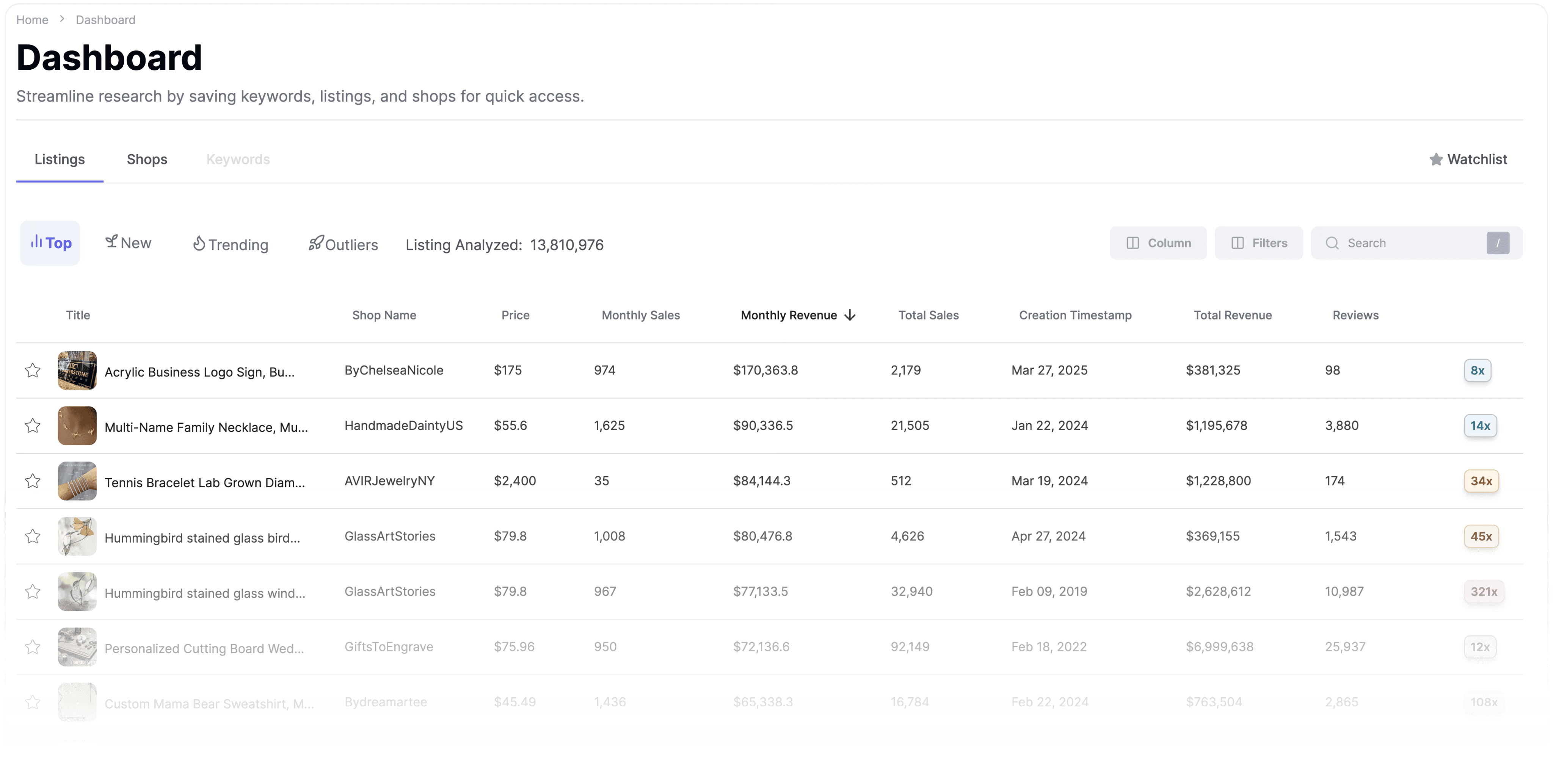
When you're looking at the data, focus on a few key things. First, are multiple sellers making sales in this category, or is all the revenue concentrated in one or two shops? A healthy niche has sales spread across many sellers. Second, what does the price range look like? If the top sellers are all priced between $25 and $40, that gives you a realistic benchmark. And third, is there a mix of listing ages? If newer listings are generating sales alongside established ones, that's a good sign that the market isn't locked up by incumbents.
This step should take you about 10 minutes per product idea. That's a fraction of the time you'd spend trying to piece together the same picture manually.
Step 4: Study What's Working (and What's Not)
Once you've confirmed that a product category has real demand, it's worth spending a few minutes looking at the top-performing listings more closely.
Open three to five of the highest-selling listings in your target niche and look at how they're structured. What does the title look like? How are they using their photos? What details do they include in the description? Are they offering personalization, variations, or bundles?
Then read the reviews. This is one of the most underrated parts of product research. Positive reviews tell you what buyers value most. Negative reviews tell you where the current sellers are falling short. If you see the same complaint showing up across multiple shops, that's a gap you can fill with a better product or better service.
You don't need to analyze dozens of listings. A focused look at three to five top performers will give you a clear sense of what the bar looks like and where there's room to differentiate.
Step 5: Check the Keywords
Before you commit to a product idea, make sure there are keywords that buyers actually use to find that type of product. A great product with no searchable keywords will struggle to get traffic.
Go back to Etsy's search bar and type in phrases related to your product. Watch the autocomplete suggestions. Each one represents a real search term that buyers use. Write down the ones that feel most relevant to what you'd be selling.
You want to look for keywords that are specific enough to attract serious buyers but not so narrow that barely anyone searches for them. "Mug" is too broad. "Handmade ceramic mug" is better. "Handmade ceramic mug with cat illustration" is even more targeted and likely to convert.
If you want to go deeper, ListingView's Search Term Analyzer lets you enter a keyword and see performance data around it. This helps you figure out whether a keyword is worth building a listing around before you invest the time.
Step 6: Make a Decision and Move On
This is the step most people skip, and it's the reason research drags on forever. At some point, you have to stop researching and start creating.
You will never have perfect information. There will always be one more shop you could analyze or one more keyword you could check. But if you've followed the steps above, you already have more insight than most sellers ever gather. You know whether there's demand. You know what price range works. You know what buyers like and dislike. And you know which keywords to target.
That's enough to make a smart, informed decision. List three to five products, optimize them based on your research, and let the market give you feedback. Real performance data from your own listings will always be more valuable than another hour of browsing other people's shops.
If a product doesn't gain traction after a few weeks, revisit your research and adjust. If it does, double down. The point is to move from research mode into action mode as quickly as possible.
A Simple Research Workflow You Can Reuse
To keep things efficient every time you evaluate a new product idea, here's the process in a nutshell.
Start by writing down a specific question you want to answer. Spend 10 to 15 minutes doing a manual scan on Etsy to get a feel for the market. Then validate with actual sales data so you're working with numbers, not assumptions. Study three to five top-performing listings to understand what's working and where the gaps are. Check that there are strong, searchable keywords for your product type. And then make your decision and start creating.
The entire process should take you 30 to 45 minutes per product idea. That's a far cry from the three-hour rabbit holes that most sellers fall into. The difference isn't about working harder. It's about having a structure that keeps you focused.
Ready to take it further? Discover how to use ListingView's tools to uncover top-performing Etsy listings, analyze competitors, and find opportunities to grow your shop with confidence.
Our team is consistently improving ListingView to provide better data, tools, and insights for Etsy sellers. Because of this, some features or screenshots mentioned in this post may look slightly different from what you see inside ListingView.