How to Find Best Selling Products on Etsy in 2026

One of the most common questions new Etsy sellers ask is some version of "What should I sell?" It's a fair question. With millions of listings on Etsy, choosing the wrong product can mean months of effort with very little to show for it. Choosing the right one can mean steady sales from week one.
The good news is that finding best selling products on Etsy doesn't require insider connections or years of experience. It requires a process. If you know where to look and what signals to pay attention to, you can identify products with proven demand before you ever create a listing.
In this guide, we'll walk through a practical, step-by-step approach to product research on Etsy — from browsing the marketplace manually to validating your ideas with real sales data. Whether you're a brand-new seller or looking to expand into a new niche, this process will help you make decisions based on evidence, not guesswork.
Why Product Research Matters More Than Ever
Etsy has grown significantly over the past few years. More sellers means more competition, and that means the gap between shops that do research and shops that don't has gotten wider.
Sellers who launch products based on personal preference alone often struggle with low visibility and slow sales. On the other hand, sellers who take time to understand what buyers are actually searching for and purchasing tend to gain traction much faster.
Product research helps you answer three critical questions before you invest your time and money. First, is there real demand for this product? Second, how competitive is this space? And third, can I realistically compete and stand out?
Skip this step, and you're essentially betting on luck. Do it well, and you're building on a foundation of data.
Step 1: Start by Browsing Etsy Like a Buyer
Before you open any tool or spreadsheet, spend time on Etsy as a shopper. This might sound obvious, but many sellers skip this step entirely.
Open an incognito browser window (this removes any personalization from your browsing history) and start searching for terms related to your interests or potential niche. Pay attention to what Etsy's autocomplete suggests as you type — these suggestions are based on what real shoppers are actually searching for.
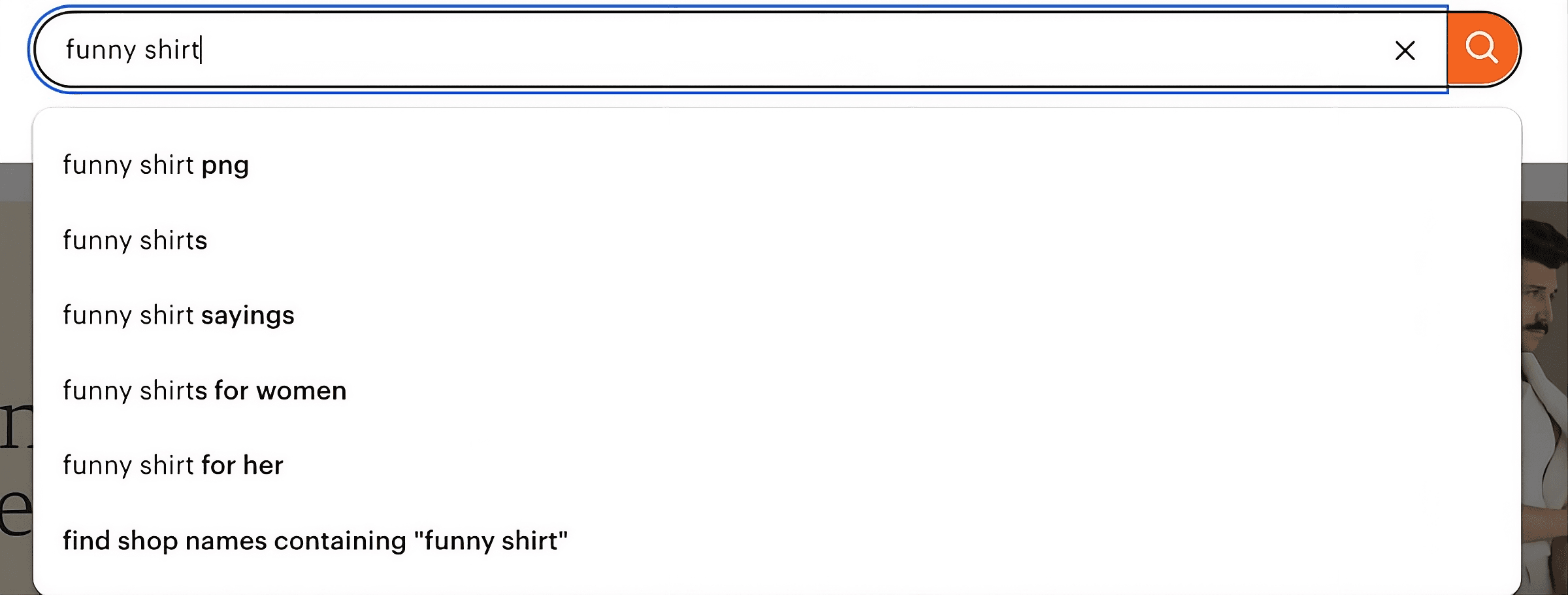
As you browse, take note of which listings appear at the top of search results (these tend to have strong SEO and sales history), how many reviews top listings have (a rough indicator of sales volume), the price range for products in that category, and whether the top results are dominated by a few large shops or spread across many sellers.
This manual browsing gives you a feel for the landscape. It's not precise, but it builds intuition — and intuition matters when you're deciding which data to dig into next.
Step 2: Use Etsy's Built-In Signals
Etsy gives you more information than most sellers realize. You just have to know where to find it.
Etsy awards a "Bestseller badge" to listings that are performing well relative to other products in the same category. When you see this badge, it's a strong signal that a product type has active buyer demand. Don't copy the listing — instead, ask yourself what about that product is resonating with buyers and whether you could offer something in the same space with your own twist.
Review counts and recency tell an important story too. A listing with hundreds of reviews that are spread over several years is different from one with 50 reviews in the past month. Recent reviews suggest current demand, while older review-heavy listings might indicate a product that's been around for a while but may be slowing down. Both are useful signals.
You should also look at shop sales totals. On any Etsy shop page, you can see the shop's total number of sales. If a shop in your target niche has thousands of sales, it confirms there's a viable market. If most shops in a category are under 100 sales, it could mean the niche is too small — or it could mean it's underserved and ripe for a strong new entry.
Step 3: Validate with Real Sales Data
Manual browsing and Etsy's built-in signals give you a solid starting point, but they have limitations. Review counts don't tell you exactly how many units a listing sold last month. Bestseller badges don't tell you whether a product's momentum is growing or fading. And browsing alone can't show you the full picture across an entire category.
This is where a product research tool becomes genuinely useful.
ListingView's Database lets you search across millions of Etsy listings and see estimated sales data for products in any niche. Instead of guessing whether a product category is performing well, you can look at actual numbers — which products are selling, how many units they're moving, and how that compares to similar listings.
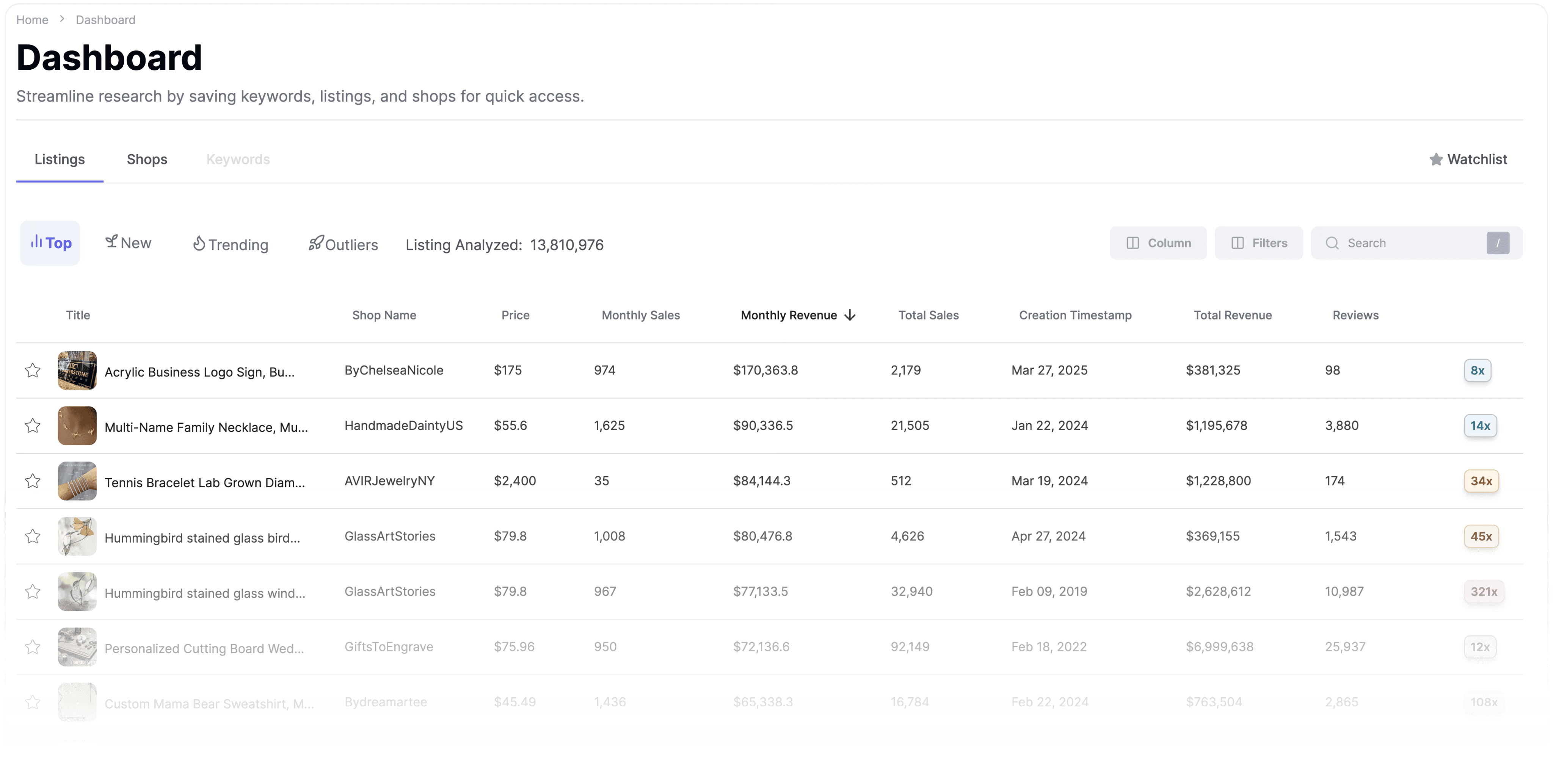
Here's how to use it effectively. Search for a product type or keyword you're considering (for example, "personalized cutting board" or "digital planner"). Sort results by sales to see what's actually selling, not just what's listed. Look at the range of sellers — is this category dominated by a handful of mega-shops, or are smaller sellers finding success too? Compare multiple product ideas side by side to see which has the strongest demand relative to competition.
The goal isn't to find one magic product. It's to narrow your options down to ideas that have demonstrated, data-backed demand.
Step 4: Analyze the Top Shops in Your Niche
Once you've identified a promising product category, the next step is to study the shops that are already succeeding in that space. This isn't about copying anyone. It's about understanding what's working and identifying gaps you can fill.
When analyzing a top-performing shop, pay attention to their product range — are they selling one hero product in many variations, or a wide assortment? Shops that do well with a focused catalog can signal a strong niche. Look at their pricing and where they sit in the market. Study their photos and branding, since strong photography is often a differentiator between shops with similar products. And read their reviews carefully. What are buyers praising? What are they complaining about? Customer complaints are often the best clues for how to differentiate your product.
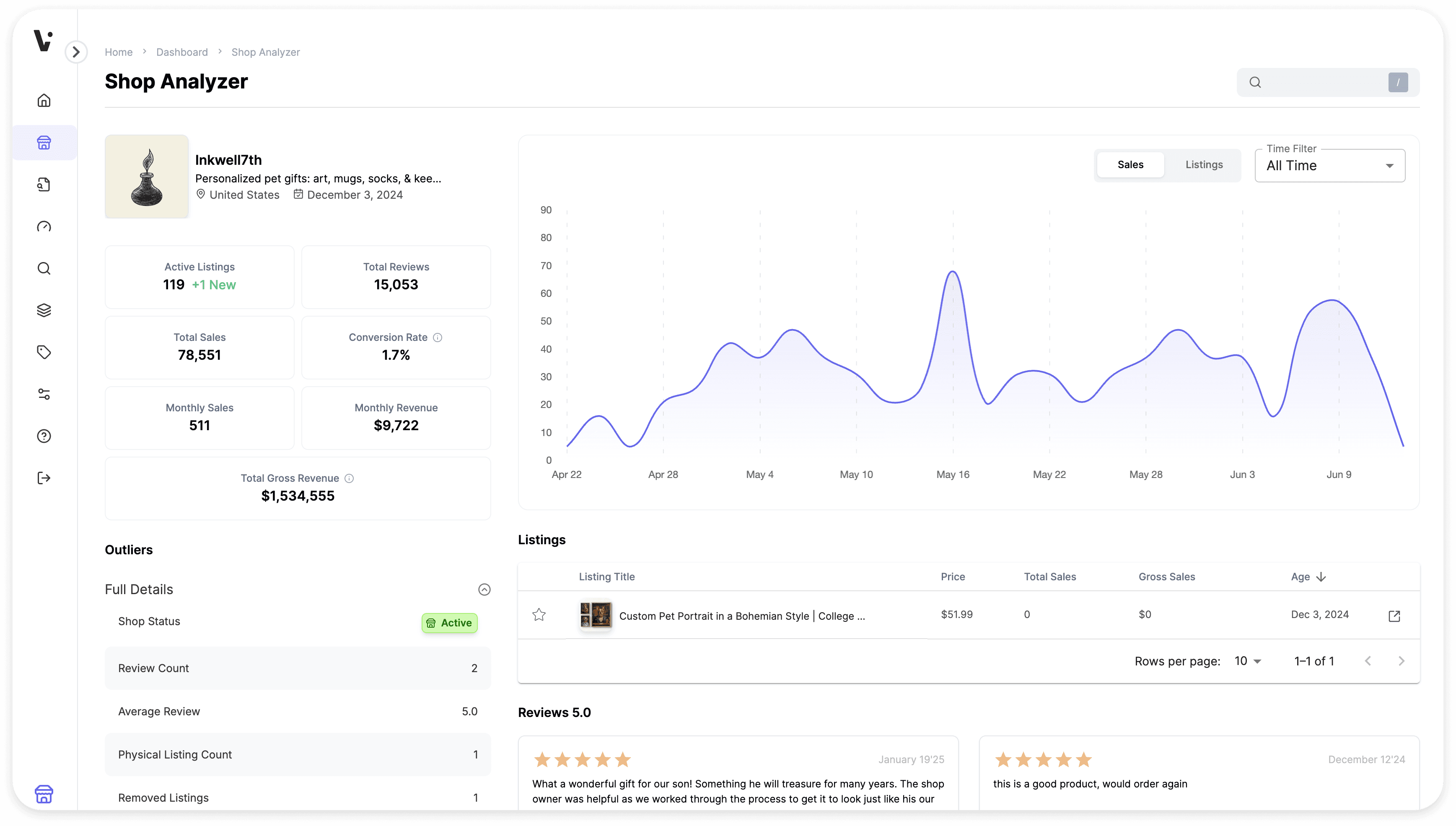
You can do this manually by clicking into each shop, but ListingView's Shops tool speeds this up significantly. Search for any Etsy shop and get a breakdown of their performance — including which of their listings are driving the most sales. Instead of clicking through dozens of products one at a time, you can see the data in one view.
Step 5: Check the Keywords Behind the Demand
Finding a great product idea is only half the equation. You also need to make sure buyers can actually find your listing when they search for it. That's where keyword research comes in.
Every time someone types a phrase into Etsy's search bar, they're telling you exactly what they want. Your job is to make sure your listing speaks the same language.
Focus on finding keywords that are specific enough to attract the right buyers (for example, "personalized leather journal for men" rather than just "journal"), actively searched by real shoppers (not just phrases that sound good to you), and not so competitive that your new listing will be buried on page 10 of search results.
Long-tail keywords (phrases with three or more words) tend to be the sweet spot for newer sellers. They have lower competition and attract buyers who are closer to making a purchase decision. Someone searching for "mug" is just browsing. Someone searching for "funny nurse coffee mug gift" is ready to buy.
ListingView's Search Term Analyzer helps here — you can enter a keyword and see data on how it's performing, which gives you a clearer picture of whether a term is worth targeting in your titles and tags.
Use your keyword findings to guide not just your tags, but your listing titles, descriptions, and even your product development. The best Etsy sellers design products around keywords with proven demand, not the other way around.
Step 6: Look for Gaps, Not Just Trends
It's tempting to chase whatever is trending on Etsy right now. And while trend awareness is important, the most profitable opportunities are often found in the gaps — places where buyer demand exists but the current supply is weak.
Here are some signs of a gap worth exploring. A keyword with decent search volume, but the top results have poor photos, vague titles, or low review counts. A product category where customers consistently mention the same complaint in reviews — slow shipping, poor quality, limited customization options. A trending aesthetic or style (like the warm, textured home decor trend in 2026) that hasn't yet been fully served in a specific sub-category. Or a niche community like teachers, dog owners, or pickleball players where product options feel generic rather than tailored.
Gaps are where smaller sellers can compete with established shops. You don't need to be the biggest. You need to be the best option for a specific buyer.
Step 7: Test Before You Go All In
Even after solid research, there's no substitute for testing in the real market. The most successful Etsy sellers treat their first few listings in a new niche as experiments, not commitments.
Start with a small batch of listings (three to five is usually enough). Optimize their titles, tags, and photos based on your research. Then give them a few weeks to gather data. Pay attention to views — are people finding your listing? If views are low, it's likely an SEO issue. Watch your favorites — are people interested but not buying? That might point to a pricing or photo issue. And track your conversions — are views turning into sales? If so, you've found a winner. If not, iterate on the listing before writing off the product.
Once your test listings are live, you can use ListingView's Listing Optimizer to score each listing against Etsy's best practices. It highlights what's strong and what could be improved — so instead of guessing why a listing isn't converting, you get specific, actionable feedback.
Testing keeps you from over-investing in unproven ideas. It also gives you real performance data you can use to optimize and expand.
Putting It All Together
Finding best selling products on Etsy isn't about finding one secret trick. It's about following a repeatable process. Browse Etsy like a buyer to build intuition about your market. Use Etsy's built-in signals like badges, reviews, and shop totals to spot patterns. Validate your ideas with real sales data so you're making decisions based on evidence. Analyze top shops to understand what's working and where you can differentiate. Research keywords to make sure buyers can find you. Look for gaps where demand is strong but existing options are weak. Finally, test with a small batch of listings, then optimize based on real data.
This process works whether you're launching your first Etsy shop or expanding an established one into a new category. The sellers who succeed consistently are the ones who let data guide their creativity — not replace it.
If you want to take the guesswork out of product research, ListingView gives you access to the Database, Shops tool, Search Term Analyzer, Listing Optimizer, plus more — everything you need to find your next best-seller. You bring the creativity. The data is already there waiting for you.
Ready to take it further? Discover how to use ListingView's tools to uncover top-performing Etsy listings, analyze competitors, and find opportunities to grow your shop with confidence. Visit the ListingView tutorials to learn how to use the platform step by step, from competitor analysis to optimizing your listings for better visibility and sales.
Our team is consistently improving ListingView to provide better data, tools, and insights for Etsy sellers. Because of this, some features or screenshots mentioned in this post may look slightly different from what you see inside ListingView.